

📣 10x Your Engineering Impact with AI (Sponsor)
If you’ve been curious how AI can help in your day-to-day engineering work, I highly recommend Formation’s Ship Faster with AI course.
You won’t just read about AI tools—they walk you through real problems you actually face on the job, like working in large codebases, generating useful tests, and breaking down complex tasks. Plus, you’ll get regular interactive mentorship from experienced engineers, like the famous L7 “Code Machine” at Meta, who’ve been applying AI to their workflows.
They’re running exclusive early access pricing, and most companies will let you expense it. It’s definitely worth checking out.
How can you tell when another person is lying to you? Well, you either know what they’re saying is wrong, or you have a feeling. What gives you that feeling? Your instincts, from when you’ve been lied to before, or a sign, like fidgeting, looking down, looking away, or just acting different. Ok, but what if the person lying is a master at lying? It’s a lot harder! They don’t show any differences in behavior, and they’re confident about what they’re telling you. AI, as amazing as it can be, is just like that, and IS a master at lying.
It can lead you in the wrong direction and be incredibly confident about what it’s saying. You believe the set of commands it tells you to run, you’re going back and forth in a conversation with the output you’re seeing, only to realize later that AI dug itself in a rabbit hole of lies because it misunderstood what you wanted.
If you’ve experienced this, you’re not alone. I use AI 25+ times per day, and it generates 75%+ of my first draft code before I review and edit it. I’ve seen it lie and misunderstand what I wanted plenty of times. Some people would throw up their hands and say, “I’m not dealing with it if it’s going to make things up.” But don’t do that! Once you learn a few tricks to tell when AI is leading you in the wrong direction, you can safely reap the 10x+ promise of it.
Who doesn’t love a little adventure to get to a treasure? 😄
To learn how to spot when AI is misleading you, we’ll first dig into the fundamentals of how it decides what to tell you. Knowing this, you’ll know where its responses are coming from, which will make you a more confident lie detector. Then, we’ll go into 6 battle-tested ways to catch AI in the act of lying, red-handed.
Let’s begin!
Know these aspects of how AI works
1) AI is a glorified autocomplete
Before the days of AI, googling was the primary way anyone found information. You’d type your question into Google, a bunch of articles would come up, and you’d sift through them for 10+ minutes until you found something you were happy with.
Now, AI exists and bridges that 10+ minute gap, so you no longer need to look through all those articles yourself. It’s already done that work for you. It’s been trained on a curated set of the internet.
BUT, there’s a huge problem. It doesn’t think. At least, not in the way humans do. It’s a probability machine. It predicts the probabilities of the next word, and generally gives you the next highest probability word, based on its training of the internet. It’s only thinking one word (or token) at a time.
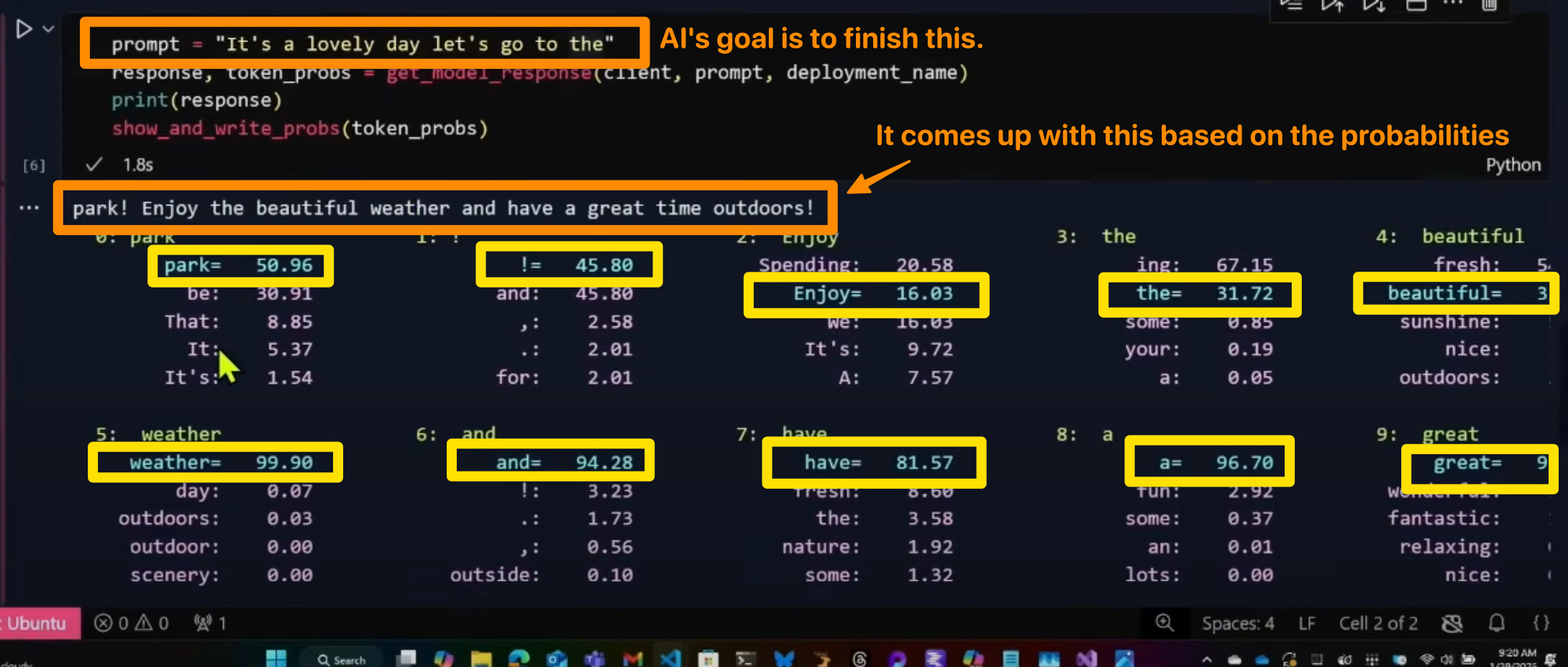
So, if in training, there was a highly reputable source with just 1 question and answer pair, but there were 1000 other pairs saying something different from non-reputable sources, AI might give you that non-reputable answer. Now, most companies apply higher weights to authoritative sources, but it’s also probably not perfect either.
You can think about AI as a probabilistic parrot (as mentioned in the talk above). It repeats what it has heard before. If in training it hears something wildly inaccurate over and over again, eventually it will just start repeating it.
Taking an example, let’s consider how AI comes up with a response to:
“What is the best way to structure a React application?”
There’s no objective way to say one way is “best,” and there are tons of different opinions online to answer this question. So when it gives me the response like this:
Jordan — short answer: use feature-first, co-located files, and strict module boundaries. Treat “app shell” as plumbing and “features” as the product. Everything else is shared utilities.
It’s giving this by approximating the most common recommendations, often by authoritative sources in training data. Not because it truly is the best and correct answer. And it might even respond differently based on how you word the question or if you ask enough times.
AI effectively combines billions of data inputs and tries to boil that down into a concise response. Those billions of inputs come from sources like Stack Overflow, help forums, Reddit, and blog posts, among others. That’s why it struggles with bespoke code or patterns it hasn’t been trained on. Once you think of AI as combining its training inputs behind the scenes and responding based on probabilities, you take less of what it says for granted and start questioning where it’s getting what it said from, because it’s not its own experience like your tech lead. It’s a combination of the world’s experience, which is good sometimes, and not-so-great other times.
2) AI is often a “helpful assistant”
System prompts tell AI to be a helpful assistant; however, this leads it to be too helpful. The out-of-the-box system prompts in most systems lead to AI trying to give you an answer even if it’s incorrect, rather than telling you they don’t know.
We can see this in the Claude 3.7 system prompt:
Claude enjoys helping humans and sees its role as an intelligent and kind assistant to the people, with depth and wisdom that makes it more than a mere tool.
That’s why adding “Be honest if you aren’t sure” to your prompts can help Claude avoid being too helpful in trying to give any response, and know that it’s ok to say “I don’t know.” Without it, an AI can’t distinguish what “helpful” means—is it giving you an answer, even if it’s incorrect, or is it being honest about factuality?
On top of providing any answer, the “kind assistant” instruction can make Claude too nice, trying to make you feel good about everything you say—leading to, “Oh, I’m sorry. You are absolutely right!” even if there’s more nuance to it for Claude to then further correct you.
For that case, I add “Be brutally honest” to my prompts, particularly when asking for feedback.
Be brutally honest. Is this approach the best way we could do it or are there other better ways?
I’d say that for an approach I recommend to AI, or an approach it came up with on its own. Without it, I noticed AI wanted to appease me with things like, “It’s definitely the best approach!” without actually thinking deeply about it.
Caveat: Newer models are better at being honest, particularly for high-confidence questions with lots of training. For example, you’ll have a hard time getting newer models to agree that 2+2=5. However, this tip is helpful for areas AI has lower confidence, like your codebase, where it would typically default to trusting you more because it wasn’t trained there.
Know how to catch AI lying, red-handed
Now that you’re armed with how AI works, let’s dive into ways to catch AI red-handed.
1) Use AI with sources where possible, then check them
Verify AI’s sources. As we mentioned before, AI is effectively a refined Google search. It eliminates the need to sift through many articles and piece information together. Some models and interfaces display sources, and I highly recommend quickly verifying the response AI gives you.
In the past, I mistakenly assumed that because AI provided sources, it couldn't be lying. Wrong! AI may mistakenly associate two distinct pieces of information together, making the statement incorrect. For example,
You: “Use deep research to find me companies that improved their build speeds by adopting new Github action runners.”
AI: “Stripe improved their build speed by 65% by adopting Github action runners (source).”
But when you check the source, you find that yes, Stripe improved their build times, but it doesn't necessarily say it was because of those new runners. The 65% was an aggregated stat across many changes Stripe made, with the new runners as only one change out of ten. AI tried to give you what you want, but was dishonest about it.
This problem was researched, showing LLMs have difficulty creating accurate citations, highlighting the importance of actually verifying the source.
Large language models (LLMs) such as DeepSeek, ChatGPT, and ChatGLM have significant limitations in generating citations, raising concerns about the quality and reliability of academic research. These models tend to produce citations that are correctly formatted but fictional in content, misleading users and undermining academic rigor.
2) Understand programming fundamentals
When you use AI, you’re often on one of two ends of a spectrum.
High control: You know what needs to be done. AI is a tool for bringing your vision to reality. It’s acting as an intelligent junior engineer that can type 1,000 words per minute, rather than being limited by our typing speed.
Low control: You don’t know what needs to be done. You’re relying on AI to tell you what needs to happen and what files to edit.
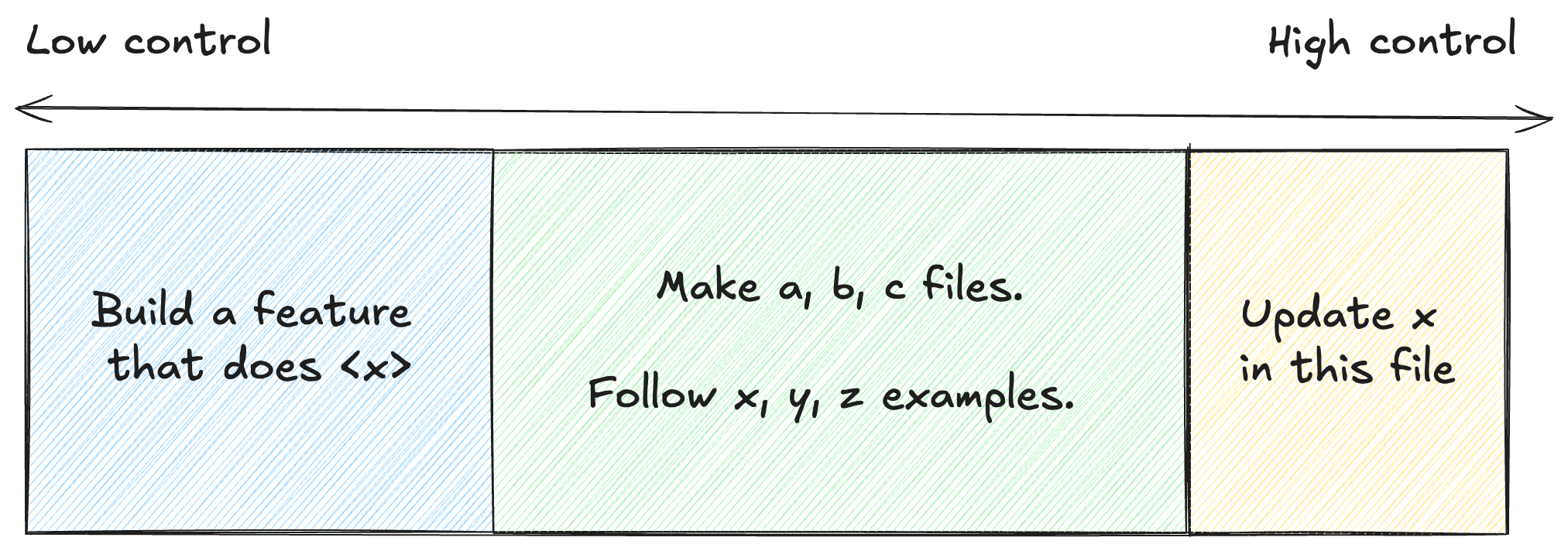
Ideally, you’re often closer to the “high control” side. Having more control in your hands prevents AI from going off the rails. Being in “low control” mode is akin to someone outside your team making a code contribution who isn’t familiar with the right places to edit, nor the proper conventions your team has set, and why.
Understanding programming fundamentals enables you to be in “high control” mode more often, with more confidence.
I don’t want to leave you with that, though. You need to know which fundamentals. In my experience, these have been most valuable for me:
For checking AI’s commands…
Most common bash and shell commands: cd, ls, cat, xargs, grep, rm, rmdir, chmod, sudo, etc.
Interacting with git and Github: add, bisect, diff, blame, push, clone, status, stash, reset, revert, merge, rebase, etc.
Other coding basics: Language syntax, error handling, clean code, immutability, performant loops, secure code.
For giving AI instructions…
Debugging strategies: See 12 debugging tools article.
Testing strategies: Unit, integration, end to end, mocking, spying, test setup and tear down.
Common algorithms, data structures, design patterns: Observer, strategy, factory, builder, adapter.
Common scripting patterns: Reading files, writing files, checking truthyness, piping and transforming data and outputs, using loggers
Where code runs: Local vs. CI, how deployment happens, containerization and Docker
If you know these, you’ll be able to confidently tell AI what you want it to do, verify what it did was the best way it could have done it, and more easily tell when what AI told you was wrong.
3) Understand what context it has and doesn’t have
You should know what the AI you’re interacting with is trained on. A basic example of this is if you open up ChatGPT and ask it questions about your codebase, you might get it to start guessing and telling you about your code—but it obviously knows nothing about your codebase, unless it’s open source, because it was trained on publicly available data and sites.
This problem is present in every AI interface. You need to know what context it does and doesn’t have. That’s why you can’t ask the AI in your IDE (agent mode) to “ship xyz feature” at your company, expecting it to find the product requirements, technical design doc, all the JIRA tickets, etc. That’s what Model Context Protocol (MCP) solves. It provides a standard interface to give AI access to all of those tools. But if you don’t have that MCP hooked up, expect AI to lie to you or tell you it doesn’t know.
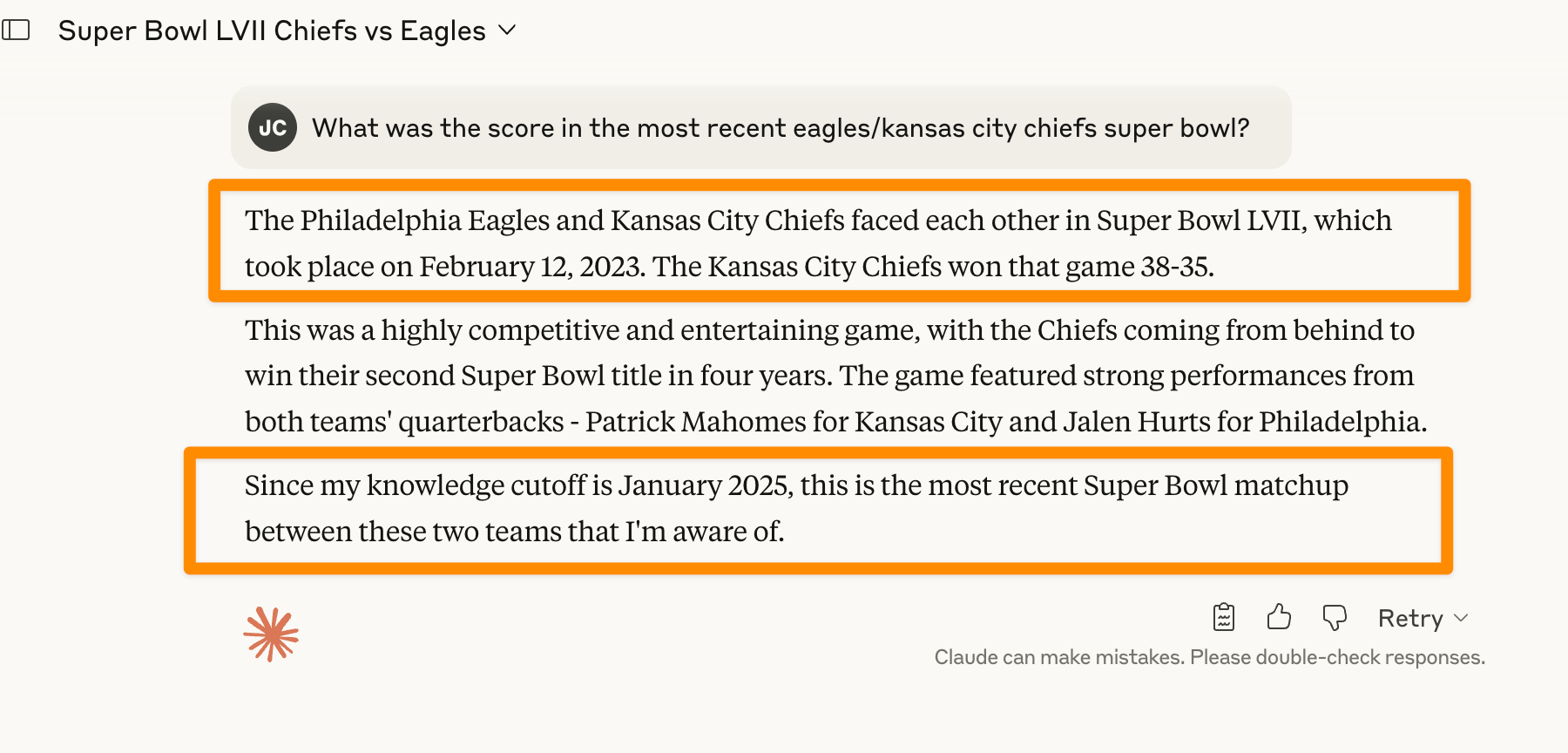
Additionally, its training is also time-bound, typically to about 6-12 months ago. It can’t answer questions about today’s news without using tools to give it additional context, like Web Search. So if you’re asking a model about the news today without that tool enabled, it might lie to you.
For practical programming use cases, you may see it struggle to help you with new tech, because it won’t know about it at all, and won’t have been trained on what people say about it.
Watch AI’s thought process for clues. It might provide subtle hints like, “The user asked me this, but I don’t have access to this, so I’m going to tell them something different.” Seeing the thought process gives you clues into what context you did or didn’t provide.
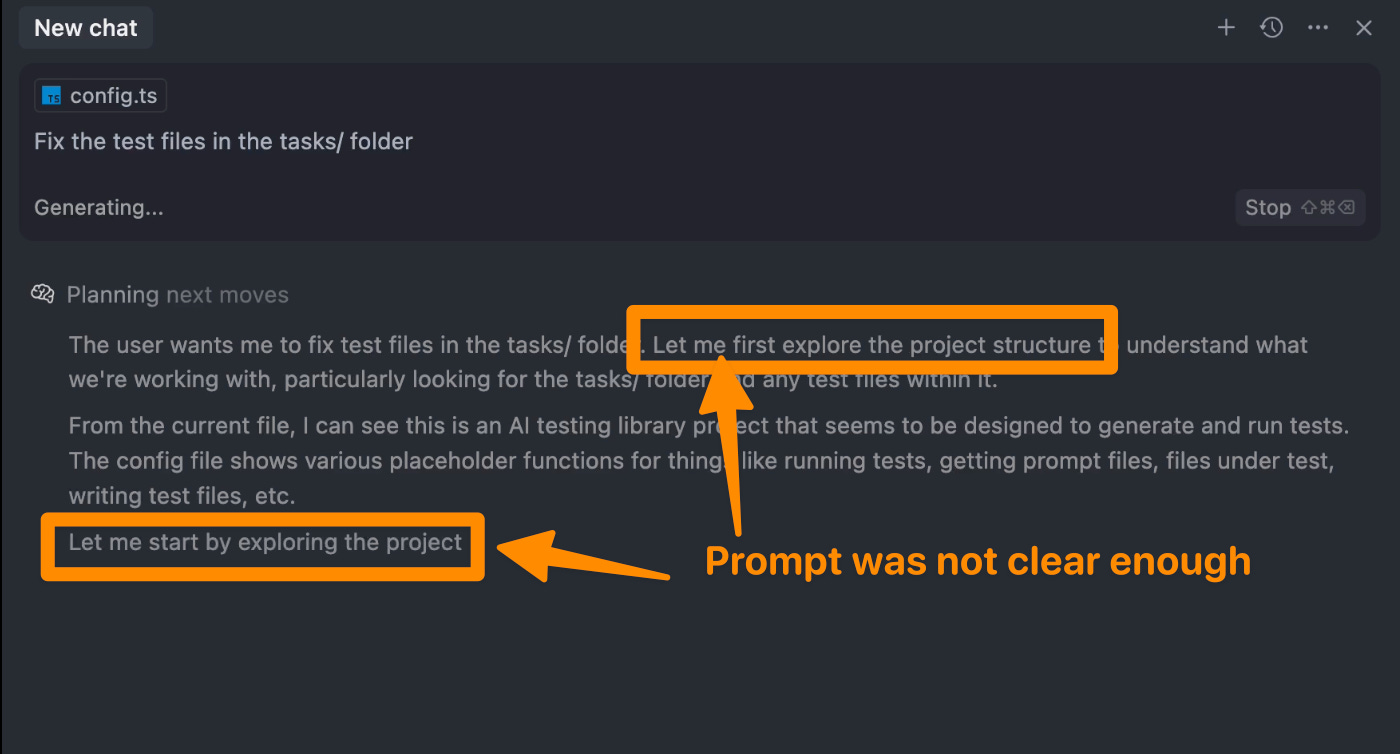
Ensure it uses the tool calls you expect. A common tendency of AI is that it doesn’t correctly identify the tool calls it should use to help it gather more context. Two common examples are:
You ask it to explain a set of files, and instead of using its file reading tools, it makes guesses based on the names of the files
You ask it a question about internal company knowledge, but it doesn’t correctly identify it needs to call out to an MCP tool for that knowledge
The best way to overcome this is to observe its process, identify the tools it’s using, and tell it the mistakes so it can correct them.
Always view working with AI as a collaborative process with a partner, and at least in the somewhat early stages we’re in, expect it to make these mistakes for now. It can only get things right the first time sometimes, and definitely not all the time.
4) Tell AI it’s ok to say “I don’t know”
As we covered earlier, AI systems are trained to be “helpful assistants,” which creates a strong bias toward always providing an answer, even when they’re uncertain or lack sufficient information. This leads to confident-sounding responses that may be completely wrong. You also don’t know the probabilities it had for each next word it came up with. It could have lacked confidence, but it didn’t come across that way in its response.
To fix this, you can tell it any of:
“Be honest if you aren't sure about any part of this.”
“It’s better to say ‘I dont know’ than to guess.”
“If you don't have enough context to give a confident answer, just tell me what additional information you'd need.”
This counteracts potential training where it would have been rewarded for sounding confident and the effect of being a “helpful assistant.” It’s more important to use this when you’re working in areas AI may not have been trained in or doesn’t have the tools available to pull in the context it would need, often when working in internal systems. Using the above prompts in the system prompts for agents has been really helpful in getting AI to just say, “I don’t know” rather than provide an incorrect, time-wasting response.
I also like the third prompt of telling AI it’s ok to ask for additional information. I’ve noticed it does a great job using second-order thinking to not just answer, but also consider additional areas where it could improve if it had more information. In practice, it would look like:
“I’m seeing this bug in <x> system, and I think it’s related to <y> folder, but I’m not sure.
Can you look into it and tell me what info you’d need from me or what commands you’d want me to run to give you more info to figure out what’s wrong?”
This makes it a much more collaborative process, rather than AI trying to give you what you want on the first try but getting it incorrect, and then potentially continuing down that invalid rabbit hole.
5) Get a different AI to verify that AI
Once you get a response from AI, you can ask another AI what their thoughts are, and it will start from a fresh slate without any preconceived ideas based on the context that was gathered already.
Think about it like going to a second doctor to get another opinion on what the first doctor found.
To test this, I did the following:
Me to AI 1: Write me an algorithm in javascript to determine when I have a day with meetings that doesn't allow me to make time for the gym and how I can restructure my day with the minimal changes possible. I can't go to the gym unless I have a 75 minute gap between meetings
AI 1 to Me: <responds with the algorithm>
Me to AI 2: I have the following algorithm to help me determine how I can minimally restructure my day to have a 75 minute slot for the gym. Can you verify and check it for me and what changes you would suggest to simplify it?
< pasted algorithm >
It found many mistakes, and one was particularly easy to spot. It had an unused parameter that was totally pointless and just passing `null` around. When I asked the original AI to spot-check itself for mistakes, rather than a new AI, the original AI did not find the same issue.
It’s possible it could have found it, but my hypothesis is that a bias was introduced because it wrote the algorithm itself. That bias isn’t there when asking a new AI. Personally, I view it similarly to how I give much better feedback to my own writing and code after sleeping on it for a day, rather than just after drafting it, when I often feel proud of what I just did. That additional level of separation allows me to give better, unbiased feedback to myself, and it seems like AI works similarly.
Research from MIT also supports this with its similar “debate” approach:
We illustrate how we may treat different instances of the same language models as a “multiagent society”, where individual language model generate and critique the language generations of other instances of the language model. We find that the final answer generated after such a procedure is both more factually accurate and solves reasoning questions more accurately.
6) Ask the right questions
There are many questions you can ask AI to verify its work.
Here are my three favorites:
What process can I go through to verify what you did was correct? Briefly provide a step-by-step summary
Doing the process yourself will give you the most confidence, and ultimately you want AI to show you how it did what it did, so that you can verify it. This prompt helps you do just that by allowing you to verify it step-by-step and check what it might have gotten wrong.
Can you write a test to verify what you did worked? Then walk me through what the test is doing
In the past, this has had mindblowing results for me, with AI writing complete, isolated, idempotent test scripts that can prove one point or another. For example, I wanted to compare how Docker builds performed under one set of commands vs. another, and it created two separate Dockerfiles with the relevant parts switched, set up timing code, and made a runnable test script.
You still need to verify what the script is doing, which goes back to the programming fundamentals point, but it’s a great way to get further along with verification. I’ve still found that using AI’s output + verifying it has been faster than me doing it all myself.
What assumptions are you making that I should verify?
AI will always “fill in blanks” based on the information you do or don’t provide. It’s nearly impossible for you to give all the context, all the time. Knowing that AI will make assumptions, and sometimes get those wrong, is what this prompt helps with.
It gets AI to be explicit about the assumptions it made, so that you can correct it. In my case with the Docker example, it assumed a few things about the environment setup that weren’t initially true, but I helped correct it after asking this question. Next time you want to check AI’s work, try this out!
📖 TL;DR
Know how AI works under the hood
AI is a glorified autocomplete. View it as a probabilistic parrot, repeating the most frequent points said across the internet. That may or may not be what you’re looking for.
AI often has the role of a “helpful assistant.” The default system prompt in most AI interfaces can lead to it giving you any answer, rather than the correct answer. To combat this, tell AI to be honest about answers it doesn’t know.
Know how to catch AI lying, red-handed
Use AI with sources where possible, then check them. AI can incorrectly tie two distinct pieces of information together.
Understand programming fundamentals. Knowing the fundamentals helps you stay closer to the “high control” spectrum and enables you to more easily verify what AI tells you.
Understand what context it has and doesn’t have. By knowing what context it has, you can know if the answer it gave you was made up or based on reality.
Tell AI it’s ok to say “I don’t know.” Without this, its training may lead it to give you an incorrect, confident-sounding answer rather than being honest that it isn’t sure.
Get a different AI to verify that AI. When you start fresh, it removes the preconceived notions from past responses and context. The new AI will give better feedback and be able to more easily fact check the original AI’s response.
Ask the right questions. You can ask it what process you can go through to verify its correctness, ask it to write a test to verify itself, or ask about the hidden assumptions it made.
👏 Shout-outs of the week
10 Leadership Lessons from 10 Years of Parenting by Chaitali Narla — Timeless leadership lessons with a fun personal anecdote for each lesson
A project prioritization framework by Sidwyn Koh on
Path to Staff Engineer — A great way to figure out what to work on for the highest impact and growth opportunities.
Curation newsletters - check out Hungry Minds by Alexandre Zajac for a solid set of curated, weekly articles in tech. High Growth Engineer is a frequent shout-out!
Thank you for reading and being a supporter in growing the newsletter 🙏
You can also hit the like ❤️ button at the bottom of this email to support me or share it with a friend to earn referral rewards. It helps me a ton!
I am not proud of sounding so victimy... but barely reeling from the blow-after-blow of everyday human lies and learning (and failing) to decode them, the prospect of having to now acquire the skill to decode the AI lies - for bare survival... is mentally & emotionally paralyzing. I want out :(
Recovering to the non-victimy adult mode now: Thanks a ton for putting this together!
Gold article 👏🏻