

📣 Easily build websites and tools (Sponsor)
I tried Lovable this week and created a personal toolkit for myself in less than 10 minutes. My tool handles common tasks like converting timestamps to date strings, converting YAML to JSON, string transformations, and more. Lovable is super flexible, so you can use it to build whatever you want.
I recommend checking out Lovable and automating something you do often, or building something totally different! On their homepage, they have a showcase of other apps people have built as inspiration.
This is the tool I built for myself. Thanks, Lovable, for sponsoring this week’s issue!
It’s been a while since we picked up the “Communicate like a Senior” series. If this is your first one, strap in for an overwhelming amount of actionable tips! I’ll also share past issues in this series at the end.
Today, we’re diving into the art of providing both the right context and the right amount of context. Great communicators are masters at this, which means they get unblocked faster and build more trust with their teammates.
You’ll learn the 6 most important areas to provide the right context, where people often make mistakes, and what to do instead. Let’s start!
(1) Tagging someone in a long thread
Tell me if you’ve seen or been on the receiving end of this before:

Now, I’m usually a big fan of the “What do you think?” question, but not here! Not in a long Slack thread with no context. By doing this, you’re putting the entire burden on the person you’re tagging to read through the thread and figure out what you’re asking.
When that happens, the person you tag either won’t respond, will be bothered, or ask for a summary of the thread and what you’re asking. All of these are negative interpersonal outcomes and increase the number of feedback loops for the person being tagged to help you. If you’ve done this before, don’t feel bad. I definitely have and sometimes need to catch myself when I’m thinking and working quickly.
To fix it, here’s what to do instead, shown through an example:
Hey @Person, we’re discussing <x> and are currently at <y> on the decision.
We’re wondering whether you think we should go with <a> or <b> based on these considerations.
<list out considerations>
Let us know what you think and if it would help to provide more context.
This message is much better, but why? The high-level principles are to:
Get to the point quickly on what you need help with. In this case, it’s a decision between two choices.
List a summary of additional context below the main point.
Offer to provide more context if needed. This shows you are considerate toward tagging them in a long thread that they might need to catch up on.
By doing these, the person tagged isn’t burdened with reading the whole thread, so they appreciate the effort you put into the clear ask. Plus, they can answer right away, with fewer feedback loops, meaning you get your answer faster and can move on.
(2) Pull requests
As engineers, we all want our pull requests to be merged faster. It feels good. You’re getting things done. But in trying to move faster, it can actually slow you and your teammates down in the future.
For example, consider if you put up a pull request and in a rush, barely provided any context in the description, and the changes themselves weren’t clear on why they were needed.
A teammate begins reviewing, and they have tons of questions:
“What’s the context behind the change?”
“Why do we need to touch this file?”
“What is this line changing?”
Now, you end up in back-and-forth mode. You’re spending time responding to each question, and it’s harder to communicate the context since they’re all in separate comments, rather than a clear description from the beginning. Then, after you respond, you need to wait for a second review round, which may take another 4 hours.
Finally, they get around to it and understand, so they approve the changes. However, all of that could have been avoided if the context had been there from the start. So when you’re writing pull requests, follow these tips:
Explain why: Every change has some reason for it. It could be that an engineer complained and started a thread, or a customer complained, or performance is bad, or we’re seeing an increase in errors. Whatever it is, list it.
Link the why: It’s not enough to just say the why. Link to the context so that a curious reviewer can check it out for themself. This is typically a Slack thread, JIRA, Google Doc, customer report, or screenshot of a bug happening.
Self-review and comment on your code: Review your own code, check for silly mistakes like leftover console logs, and comment on anything you see where someone might ask, “Why are we doing it this way?” or “What is this doing?” This is particularly helpful if you get reviews from people who aren’t actively working in your domain area.
Doing these not only gets you faster reviews, but also saves you and your teammates time when revisiting the code 6-12 months later and trying to remember why a particular line is the way it is.
(3) Asking someone for help
When asking for help, make helping you as easy as possible.
Let’s work from an example of what not to do:
❌ “Hey, the code you shared earlier isn’t working. What should I do?”
Now, this is actually a perfect starting point—but definitely not what you should hit send on. To improve this, you need to work backward from what the persons next question will be.
In this case, it’s likely, “What is not working about it?”
So we improve it more:
⚠️ “Hey, the code you shared earlier isn’t working. The error is <x>. What should I do?”
What’s their next question? It’s likely, “What have you tried so far?”
So we improve it more:
✅ “Hey, the code you shared earlier isn’t working. The error is <x>.
I’ve tried to do <a>, <b>, and <c> so far, but they all result in the same error.
Do you have any other ideas?”
This is much better. It answers all the upfront questions the person would have, and gets right to what you need from them, which is whether they have any other ideas on what to try.
Additionally, there are a few bonus tips. Often, you’ll be asking for help from busy people who may be managing 3-6 contexts at once, so even saying “the code you shared” could be unclear. I know this because I’ve had the person I’m asking for help tell me they have no idea what I’m talking about, even though they only shared their suggestion with me the day before. To account for this, add hyperlinks and screenshots to the relevant parts that would make it easier for them to quickly gather the context and help you.
In this case, if they shared the code with me via Slack, I would hyperlink “the code” to their Slack message. Or if I already pushed the code to Github, I might hyperlink it to the file on Github where that code is like this, then hyperlink their message to the “shared earlier” part, like this:
“Hey, the code you shared earlier…”
This way, they can get all the context they need purely from everything you provide in the message, without having to scroll up in Slack or find your branch on GitHub.
Additionally, share relevant screenshots, draw arrows, boxes, and write text on the screenshots to communicate it even more clearly.
Combining all of these makes your message crystal clear and makes it a joy to help you out, which gets you answers faster.
(4) Asking a support channel for help
Now, let’s consider the same situation, but in a support channel rather than DMing someone directly. The dynamics change slightly because the amount of context that any given person has in the channel is low, compared to when you're messaging a person directly—they likely have medium to high context on what you're asking and working on.
All the same principles and tips from the previous step apply, but there are two more to keep in mind. Let's assume you want to ask something like:
❌ “How can I build an AI agent in CI?”
From this question, you’re likely to only be met with confusion. But why? For two reasons:
Specificity: The question is not specific. It’s not clear what you’re trying to do.
Motivation: They don’t understand why you’re doing it.
On specificity, both “AI Agent” and “in CI” are unclear. Agent is an overloaded term and can mean so many things, so you really need to dig into your use case more. And “in CI” can also mean many things, since at large companies, CI exists in so many forms. We can solve this by adding more details:
⚠️ “How can I wire up code to run in our <specific pipeline> that uses our new AI agent library?”
Sidenote: Both “pipeline” and “AI agent library” should be hyperlinked to their source
This communicates much more of the intent of what you’re trying to do by being specific. However, it’s still missing the second piece—motivation.
You’ll know you missed this when someone responds with, “Can you explain more of the underlying use case or why you’re trying to do this?” This is a pretty common response in support channels, and it makes sense. They want to give you the simplest possible solution for your problem. It’s similar to how we always recommend asking “why” to product managers so we can propose simpler solutions.
To add the why, you can either explain it inline or link to a doc below your request.
✅ Option 1 (inline): For context, I’m trying to build an agent that can autogenerate documentation at PR time.
✅ Option 2 (doc link): For context, this is the relevant 1-pager doc
Personally, I prefer a combination of both—option 3
✅ Option 3 (combination): For context, I’m trying to build an agent that can autogenerate documentation at PR time. This is the relevant 1-pager doc
This is nice because it gives a TL;DR for those who don't want to go into the doc, but provides the doc for those who are extra curious.
The next time you're asking a question in a support channel, just remember specificity and motivation. Be specific with your request, and explain why you need it.
(5) Project updates
There are two places where project updates typically occur—emails and Slack (or your messaging app).
In both of these, my big tip is to use linked list updates (learned from Rahul Pandey). Whenever you give an update, you also link to the previous update.
Why? For two reasons:
Entire history available: It allows anyone to view the entire project history by following the linked list of updates. Having this reference is great for quickly accessing important links or understanding the changes from week to week.
Easy monthly updates: It makes it easier for you to write aggregated monthly updates or your launch email when discussing challenges and the process involved. It’s also great for reference during your performance review. You can link to the last update and suggest the reader follow the chain for details, and you can use it for information gathering.
To do this in emails, first draft them in Google Docs via the @email helper. Then in your update email, link to the past update at the end for those curious about the update chain.
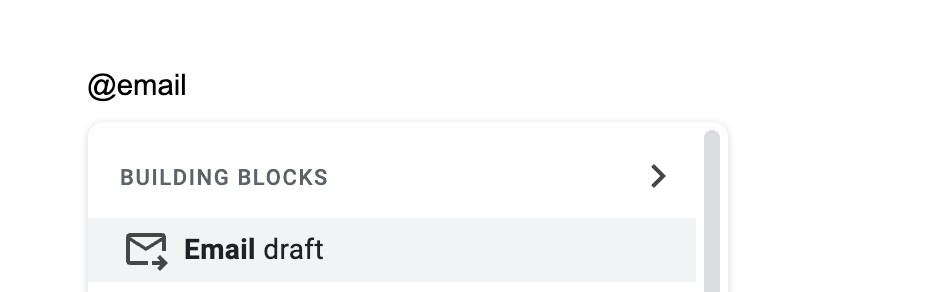
Once you hit enter, you’ll see an interface like this:
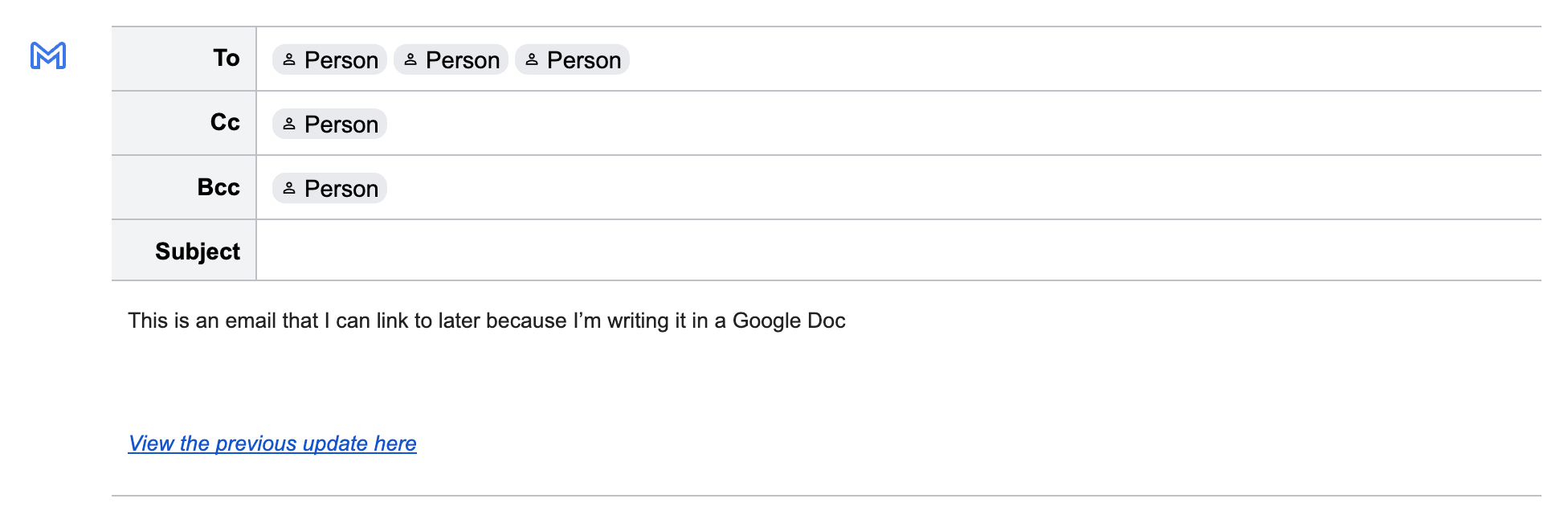
In Slack, this becomes a lot easier, and it would look like this:

And voila! You can quickly access every single update by tracing the linked list. It’s one of my favorite applications of computer science in communication 😂
📖 TL;DR
Tagging someone in a long thread: If you tag someone in a long thread, don't make them catch up on their own. Summarize the situation and make a clear ask.
Pull requests: Don't just say what the code change achieves. Explain why you're doing it and what problem it solves. Link to the Slack thread, user complaint, error logs, dashboards, etc. This gives valuable context for the next person—who may be you—wondering why the code works this way.
Asking someone for help: Make it as easy as possible for them to help you. Show and tell them exactly what you did and what went wrong. Provide error messages, screenshots, and repro steps.
Asking a support channel for help: Your question should be specific enough that they know what you want to do, with enough context on why you want to do it, so they can suggest something better.
Project updates: Use "linked list" updates. When you write an update via email or Slack, link to the prior one so anyone interested can see more context on how it's been trending. Plus, it makes it easier for you to write each update, since referencing the previous week is important for a complete update.
View previous “Communicate like a Senior” articles here:
Thank you for reading and being a supporter in growing the newsletter 🙏
You can also hit the like ❤️ button at the bottom of this email to support me or share it with a friend to earn referral rewards. It helps me a ton!
Actionable steps. Thank you!
Great post!